-
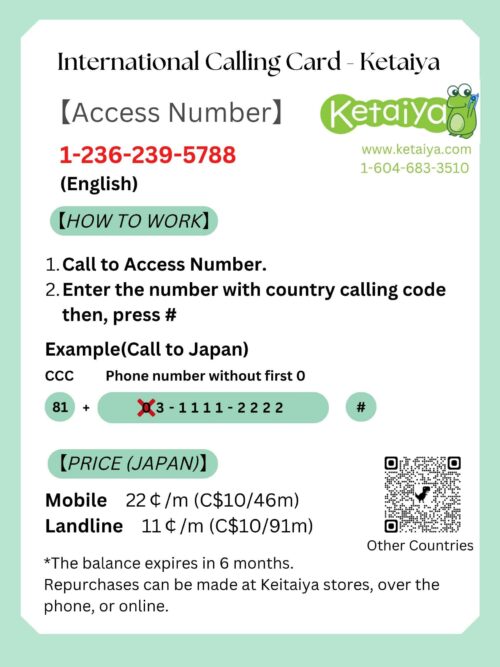
 This is an international call service provided by Keitaiya. By depositing international calls to your current Canadian phone number, you will be able to make calls to Japan and other countries. The biggest feature is that there is a six-month validity period—far longer than what other companies offer—allowing you to make international calls at any time during that six-month window while using the phone number. *If you make a call for more than the deposited amount, the call will be disconnected. *The amount for the international call will be credited to the Canadian phone number entered in Phone in Billing details on the purchase screen. Only Canadian phone numbers can be used. *After the staff confirms the customer's payment, the staff will process the transaction during business hours (Monday to Saturday, 1:00 pm to 5:00 pm). *This product price includes the international call charge ($10), online fee ($3), and consumption tax. If you purchase at Keitaiya store, there will be no online fee ($3).
 -
 This is an international call service provided by Keitaiya. By depositing international calls to your current Canadian phone number, you will be able to make calls to Japan and other countries. The biggest feature is that there is a six-month validity period—far longer than what other companies offer—allowing you to make international calls at any time during that six-month window while using the phone number. *If you make a call for more than the deposited amount, the call will be disconnected. *The amount for the international call will be credited to the Canadian phone number entered in Phone in Billing details on the purchase screen. Only Canadian phone numbers can be used. *After the staff confirms the customer's payment, the staff will process the transaction during business hours (Monday to Saturday, 1:00 pm to 5:00 pm). *This product price includes the international call charge ($10), online fee ($3), and consumption tax. If you purchase at Keitaiya store, there will be no online fee ($3).
 -
 This is an international call service provided by Keitaiya. By depositing international calls to your current Canadian phone number, you will be able to make calls to Japan and other countries. The biggest feature is that there is a six-month validity period—far longer than what other companies offer—allowing you to make international calls at any time during that six-month window while using the phone number. *If you make a call for more than the deposited amount, the call will be disconnected. *The amount for the international call will be credited to the Canadian phone number entered in Phone in Billing details on the purchase screen. Only Canadian phone numbers can be used. *After the staff confirms the customer's payment, the staff will process the transaction during business hours (Monday to Saturday, 1:00 pm to 5:00 pm). *This product price includes the international call charge ($10), online fee ($3), and consumption tax. If you purchase at Keitaiya store, there will be no online fee ($3).
 -
 *A SIM-unlocked device is required to use this product. *This product does not guarantee the operation of all applications and services. *The following bands (radio waves) are supported. 5G ・N78 (3.5 GHz) 4G LTE ・Band 3 (1800 MHz) ・Band 20 (800 MHz) ・B32 (1500 MHz Suppl. DL) *One day is from 12:00 AM to 11:59 PM British Summer Time.
 -
*A SIM-unlocked device is required to use this product. *This product does not guarantee the operation of all applications and services. *The following bands (radio waves) are supported. 5G ・N78 (3.5 GHz) 4G LTE ・Band 3 (1800 MHz) ・Band 20 (800 MHz) ・B32 (1500 MHz Suppl. DL) *One day is from 12:00 AM to 11:59 PM British Summer Time.
-
 Please set APN in Japan 【User Manual】How to Use the SIM Card STEP1:Turn off your device and set the SIM card in position Taking out the SIM card
- Wearing gloves, push the SIM card upward from the back.
- Push out the released SIM card to remove from the card completely.
- Turn off your device and insert the SIM card. Turn on your device. * For details on how to set up your device, please refer to your device's user manual.
The set-up procedure and the setting names may differ depending on the OS and / or OS version of your device. For AndroidName ppsim APN ppsim.jp User name pp@sim Password jpn Authentication type PAP or CHAP - Select [Settings] on the main menu.
- Select [Settings] - [Wireless & Networks] - [More...], and then select [Mobile networks].
- Select [Access Point Names], and then select [New APN] from [+] or from the menu. Enter the APN, and authentication type provided above.
- Select [Save] from the menu, them return to the APN list and select the APN that you set up.
- Tap the settings icon on the Home screen.
- Select [Cellular] and turn on [Enable 3G] or [Enable LTE].
- Select [Cellular], and then select [APN Settings] or [Cellular Network].
- Set the Cellular settings using the APN provided above.
-
 Please set APN in Japan 【User Manual】How to Use the SIM Card STEP1:Turn off your device and set the SIM card in position Taking out the SIM card
- Wearing gloves, push the SIM card upward from the back.
- Push out the released SIM card to remove from the card completely.
- Turn off your device and insert the SIM card. Turn on your device. * For details on how to set up your device, please refer to your device's user manual.
The set-up procedure and the setting names may differ depending on the OS and / or OS version of your device. For AndroidName ppsim APN ppsim.jp User name pp@sim Password jpn Authentication type PAP or CHAP - Select [Settings] on the main menu.
- Select [Settings] - [Wireless & Networks] - [More...], and then select [Mobile networks].
- Select [Access Point Names], and then select [New APN] from [+] or from the menu. Enter the APN, and authentication type provided above.
- Select [Save] from the menu, them return to the APN list and select the APN that you set up.
- Tap the settings icon on the Home screen.
- Select [Cellular] and turn on [Enable 3G] or [Enable LTE].
- Select [Cellular], and then select [APN Settings] or [Cellular Network].
- Set the Cellular settings using the APN provided above.
-
 Please set APN in Japan 【User Manual】How to Use the SIM Card STEP1:Turn off your device and set the SIM card in position Taking out the SIM card
- Wearing gloves, push the SIM card upward from the back.
- Push out the released SIM card to remove from the card completely.
- Turn off your device and insert the SIM card. Turn on your device. * For details on how to set up your device, please refer to your device's user manual.
The set-up procedure and the setting names may differ depending on the OS and / or OS version of your device. For AndroidName ppsim APN ppsim.jp User name pp@sim Password jpn Authentication type PAP or CHAP - Select [Settings] on the main menu.
- Select [Settings] - [Wireless & Networks] - [More...], and then select [Mobile networks].
- Select [Access Point Names], and then select [New APN] from [+] or from the menu. Enter the APN, and authentication type provided above.
- Select [Save] from the menu, them return to the APN list and select the APN that you set up.
- Tap the settings icon on the Home screen.
- Select [Cellular] and turn on [Enable 3G] or [Enable LTE].
- Select [Cellular], and then select [APN Settings] or [Cellular Network].
- Set the Cellular settings using the APN provided above.
-

This is an eSIM plan for use in Japan.
Enjoy unlimited data for 10 days with high-speed 5G/4G connectivity.
No phone number is included, but you can use apps like LINE, WhatsApp, or Messenger for calls and messages.
No need to change your physical SIM — simply scan the QR code to activate instantly.✅ Stable coverage throughout Japan
✅ Unlimited data with fair usage policy
✅ Perfect for short trips or business travel -

This is an eSIM plan for use in Japan.
Enjoy unlimited data for 10 days with high-speed 5G/4G connectivity.
No phone number is included, but you can use apps like LINE, WhatsApp, or Messenger for calls and messages.
No need to change your physical SIM — simply scan the QR code to activate instantly.✅ Stable coverage throughout Japan
✅ Unlimited data with fair usage policy
✅ Perfect for short trips or business travel -
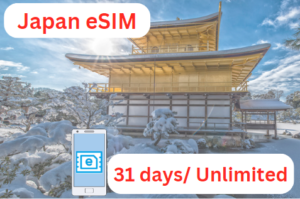 【How to Use?】 When you arrive in Japan, please connect to Wi-Fi first, and set up eSIM on your device. The instruction of eSIM set-up will be sent through email, after we confirm your order. STEP1:Access to Activation URL. Your activation URL will be sent through email from us. STEP2:Request activation code. You can complete this procedure from activation URL page. STEP3:Wait for around 15min. (Activation code will be issued for around 15min.) STEP4:Fill out activation code on your device.
- Maintenance time will be from 10:00 p.m. Tuesday to 9:00 a.m. Wednesday, Japan time.
- If you request an "Activation Code Issuance" during the maintenance time, it may take some time until the code is issued. Please wait as the codes will be issued sequentially.
-
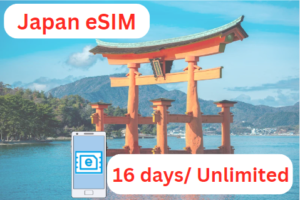 【How to Use?】 When you arrive in Japan, please connect to Wi-Fi first, and set up eSIM on your device. The instruction of eSIM set-up will be sent through email, after we confirm your order. STEP1:Access to Activation URL. Your activation URL will be sent through email from us. STEP2:Request activation code. You can complete this procedure from activation URL page. STEP3:Wait for around 15min. (Activation code will be issued for around 15min.) STEP4:Fill out activation code on your device.
- Maintenance time will be from 10:00 p.m. Tuesday to 9:00 a.m. Wednesday, Japan time.
- If you request an "Activation Code Issuance" during the maintenance time, it may take some time until the code is issued. Please wait as the codes will be issued sequentially.